We Help Commercial
Appraisers Be More
Productive.
We’re Commercial Appraisers, So We
Understand Your Day-to-Day Challenges.
We’re Commercial Appraisers, So We Understand Your Day-to-Day Challenges.
Use DataComp Suite software to track your commercial comps, automate appraisal report writing and manage your office’s workflow.

You've retyped your last comp.
Stop looking for comps in old appraisals and reconfirming the same comps over and over.
Commercial appraisers get bogged down in details. Replace your tedious manual processes with DataComp’s powerful tools.
The #1 Commercial Comp Software Trusted By 5,000+ Commercial Appraisal Firms.


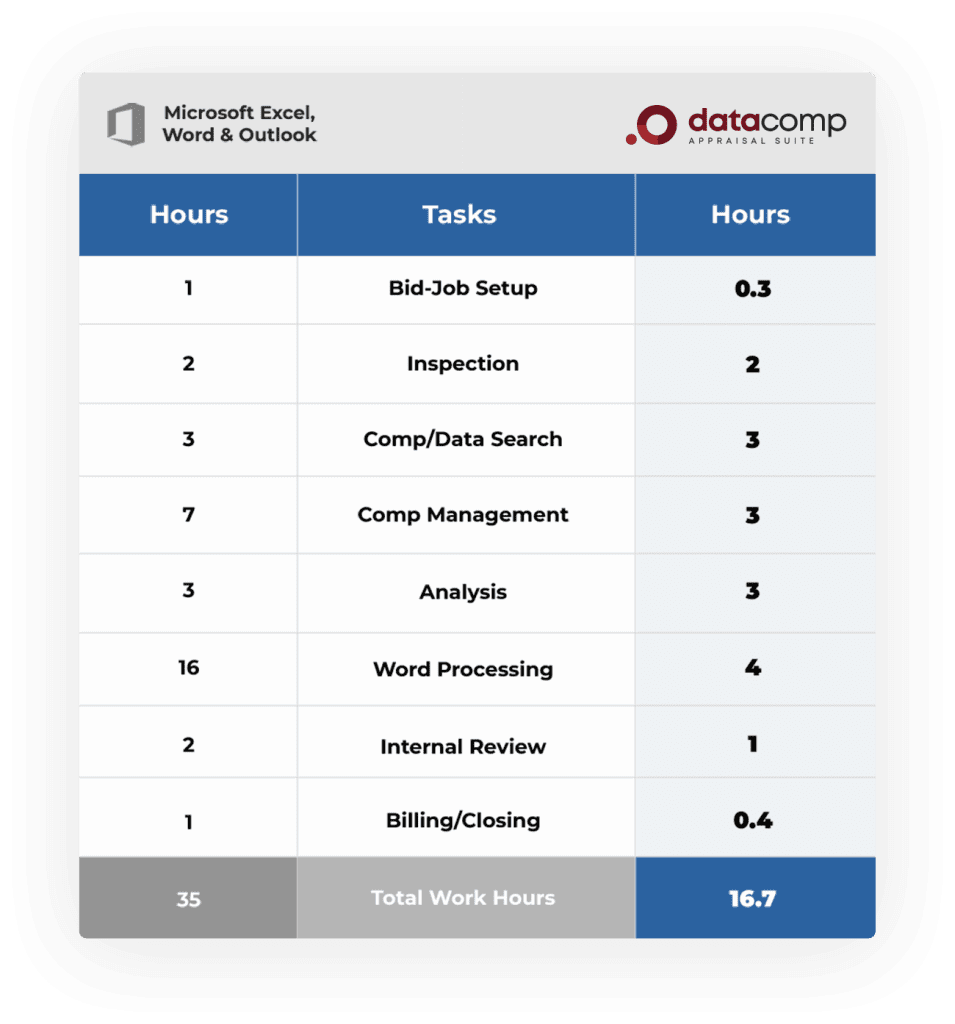
Cut back your work hours by about 50% when using DataComp Suite.
Time is money. Your hourly gross production will increase substantially, making your day-to-day work less tedious. Move away from the manual process.
Calculate your own appraiser opportunity here.
Report writing that’s 100% your format.
Typing over old reports creates an exhaustive journey of copy & paste. Old reports have previous subject data that sometimes is missed, generating potential mistakes. External reviewers often catch these errors, making you revise the report after delivery and dings your firm’s reputation by your bank clients.
Reduce your worry of report errors and inconsistencies. Feel confident that your reports will look exactly the way they do now without the errors.


The most popular comp database for commercial appraisers in the US.
Giving appraisers a function-rich, powerful platform for confirming, analyzing and retrieving commercial real estate transactions.
Print directly to your Excel adjustment girds, full comp write-ups in Word and create Google comp maps.

Report writing without having
to learn new software.
Drop keywords to automate your current report format. You choose how to best link the Excel input to the Word output.
Edge has no macros. So don’t worry that Microsoft updates will break your templates. When you click merge, the entire report flows directly into your reports. Leverage your appraiser’s efforts by sharing common data in an in-house library of your design.



Bid effectively, track all bid details and keep track of all jobs in-process.
Simplify the flow of information between the firm owner, your appraisers and if needed, your bookkeeper. Take control of due dates. Help your internal reviewers better calendar their review load. Generate appraiser production reports, bid to engagement capture rates and work in-progress metrics.
Feel good knowing the status of all your reports. Manager also becomes your job log.
We Securely Host Your Data in Microsoft Azure
Remove the stress of having to maintain your servers on-premises.
Improve Your
Appraisal Delivery

Check Out What
Appraisers Are Saying

“Manager has become our office lifeblood in terms of monitoring and tracking production workflow. It has also improved our teamwork coordination with our Monday meetings to go over production and due dates. I’m not sure what we would do without Manager.”
Taylor Vandever, JD, MAI
THE CRV GROUP, INC

Check Out What
Appraisers Are Saying

“We have been using Edge since 2011. Our productivity has increased over 40%. I am the sole MAI in our company and therefore, must review all reports. It has reduced my review time by 75% or more. I would not want to go back to the “old way”. Templates for each property type further increase efficiencies. This software is very flexible with a short learning curve. Users can make the system as simple or as intricate as desired. The Realwired staff is very accommodating and readily available. The payback period was less than 3 months.”
W. Shaun Wilkins, MAI, CCIM

Check Out What
Appraisers Are Saying

“DataComp is terrific. Powerful, flexible and easy to use. DataComp has a short learning curve and provides instant organization, easy sharing and great search ability for every kind of comp data. It is easily one of the best investments I’ve ever made.”
Robert Gagliano, MAI, CRE

Check Out What
Appraisers Are Saying

“Edge allowed me to have more confidence with my appraisers, especially the trainees since all they had to do was follow the script. I had a feeling of progress as I automated my reports that were not only faster, but the reports got better with fewer mistakes. The better quality reports helped me retain clients and compete like a national.”
Cody Jetton, MAI, CRE CEO
Mearstone Group
Commercial Evaluation
Report Template
Commercial evaluations that comply with USPAP.
Eval format that your department and fee appraisers can use right now.